Welcome to the AIR Release Notes blog post series.
Welcome to the AIR Release Notes blog post series.
Welcome to the AIR Release Notes blog post series.

Binalyze is delighted to announce we are joining the EU’s ECHO Network project as a vendor, making us the first Digital Forensics and Incident Response participant in this network.
This is the stable release of the previous RC version (v.1.7.45)
With the release of Binalyze AIR v1.8.0, we are introducing network capture capabilities to the acquisition profiles so you can capture both Network Flow (TCP/UDP connections) and PCAP IP packet data directly within the AIR platform. This upgrade brings significant advantages by further consolidating all your digital forensics activities into one solution and collaborative platform that delivers automation to save you time, reduce your costs and increase efficiency.

Binalyze AIR v1.7.50 is now available.
Some history;
Digital forensics is 40 years old, so are the methods…”
Do you remember how much time you spent acquiring an image, taking it to your lab, processing it with powerful machines running traditional forensics solutions in order to get a timeline of events that took place? Editing CSV files, exporting Event Logs, dealing with time zones, trying to combine them into one large file, using open source tools, spending hours, and hours, and hours if not days, losing the most precious resource of all: “Time”. Now, it is time to change it!
Let me begin with how it started. We released IREC TACTICAL almost 3 years ago to address the problems of our industry. The concept was simple: Changing IR evidence acquisition into a 1-click job. So we would speed up, decrease the need for communication and make the “collection” phase of IR easier than ever.
Although easy to describe, it was not a simple task. Did we manage it? With the great support of our users, we absolutely did! There is now a solution for 1-click evidence collection. With IREC TACTICAL, you can collect more than 260 different pieces of evidence with the click of a mouse. Besides collecting almost everything you would need to understand what went wrong on that endpoint, it also creates a self-contained HTML report, time-stamps it for non-repudiation and protects the collected evidence against ransomware modifications!
TACTICAL was great and it still has a heavy development roadmap that adds great features with every new release. However, in cases we were involved, there was one another huge problem: Remote evidence collection and the lack of automation. When you have one endpoint, you can collect evidence one way or another. Make some phone calls, send some emails, ask IT admins and finally RDP into the machine and run IREC. But if there is more than one endpoint located in different places, continents and time zones, the responders still had a lot to do alongside scratching their head. So we developed Binalyze AIR, the most comprehensive automated IR and remote forensics solution on the market that can integrate with any RESTful trigger source.
Once integrated (that takes only 5 minutes), 03:00 AM in the morning, your SIEM creates an alert and, voila, AIR starts doing its job automatically! Just like having a 24/7 available first responder waiting for your call, going to the crime scene, capturing photos of every single corner in just minutes. When your analysts arrive in the morning they have all the evidence of what happened on that endpoints. But what happens if more than one endpoint involved in the case? Just like having 2 crime scene photos captured from different places in different time zones. You spend hours combining these two together. What if you have 3, 4, 5 of these… You already know the answer. This was the question we were asked by a significant number of our customers that led to the development of TimelineIR.
I am sure you can name a bunch of solutions that can create a timeline starting from traditional forensics solutions to open source command line tools. They are all great but if the clock is ticking, you need something much faster and easier! Something that won’t fight against you, something that will speed you up and show you what you need without making you deal with nitty-gritty details…
TimelineIR is the brand new feature of Binalyze AIR that:
Creates a timeline investigation “remotely” in just 5 minutes,
Collects almost everything from an endpoint that has a timestamp attribute. To name a few, Processes, DLLs, Shellbags, Shimcache entries, Prefetch files, Browser History for all major browser, Relevant Event Logs, Autorun Entries, Services, Downloaded Files, Recycle Bin, SRUM and so on…
Presents this is in a web-based interface, that is ultra-optimized for speed and ease of use,
Lets you flag events making them immediately visible to the other analysts working on the same investigation,
Enables filtering for specific events based on event type, date and time, computer name, user name and event data,
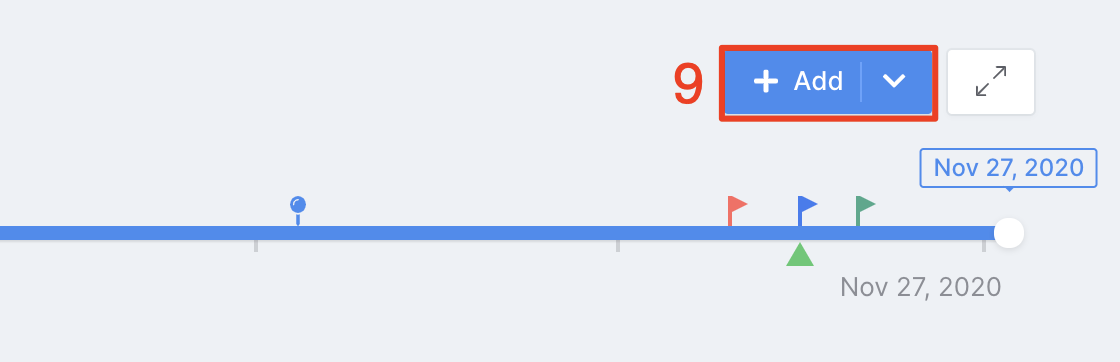
Lets analysts add milestones based on what they hear from the affected users or customers,
Decreases the time of investigation by multitudes,
Thus, fixing the biggest problems of Enterprise IR Investigations.
Having all these said, now it is time to showcase how easy it is.
Create an investigation named “First Investigation”,
Select the timezone of the investigation,
Add an endpoint to investigation,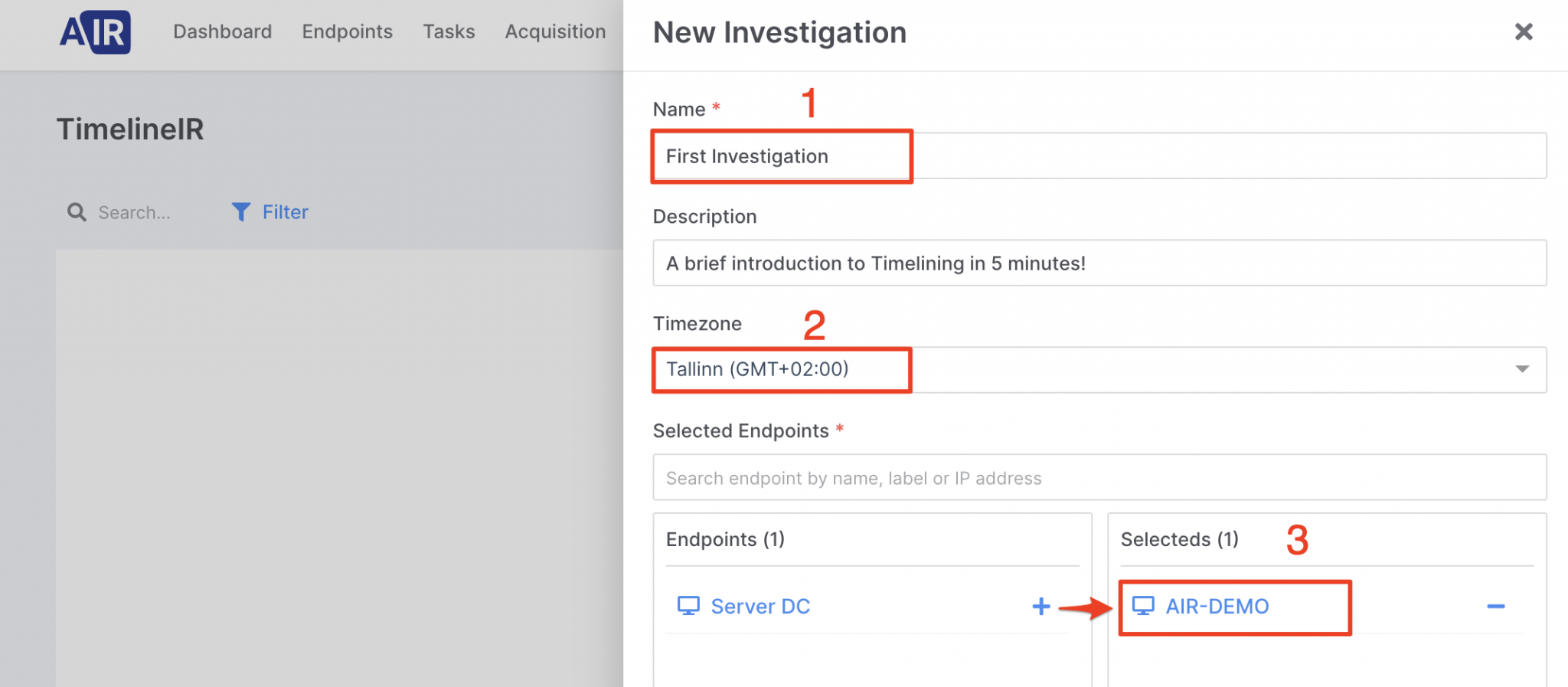
Wait for the processing of forensic evidence to complete in “5 minutes”,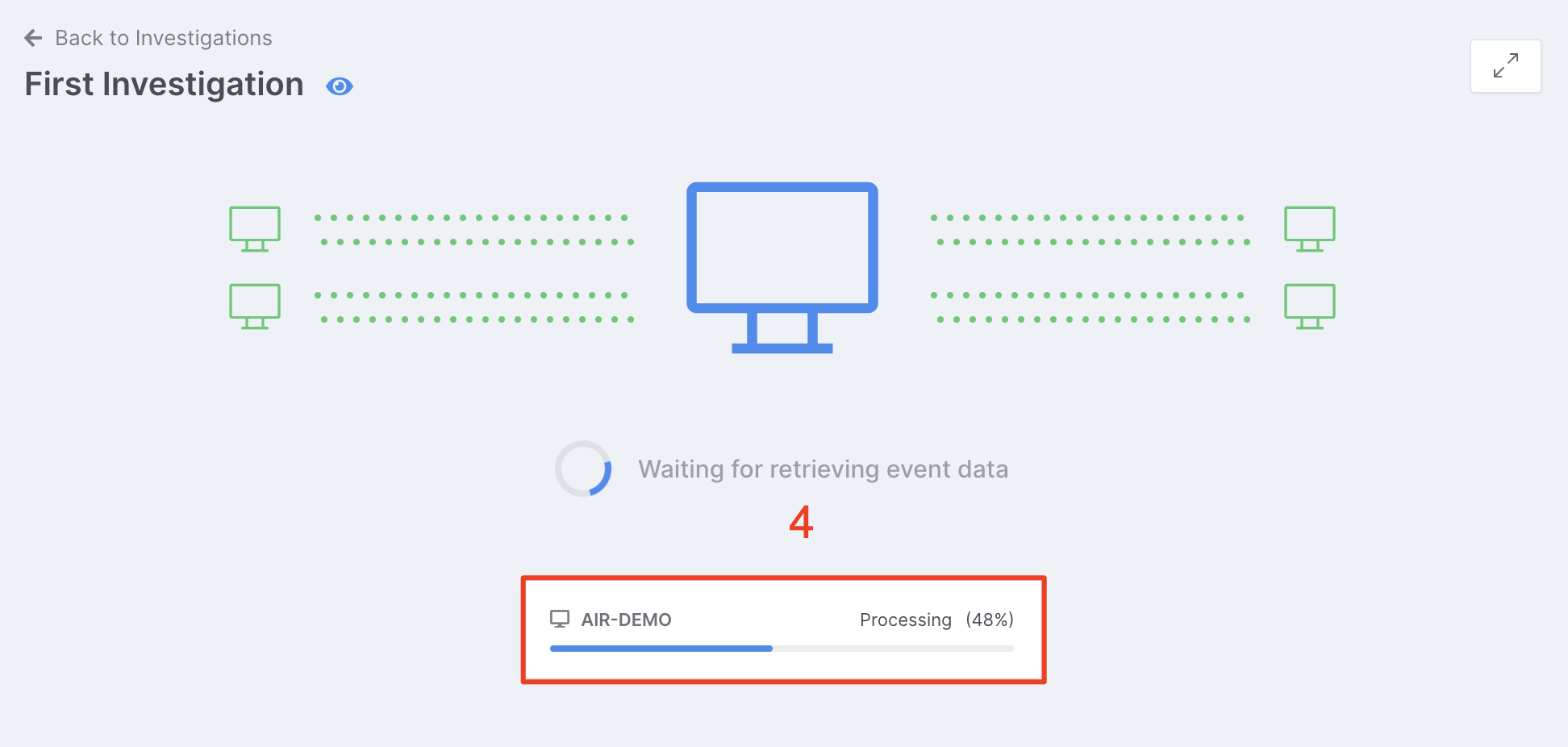
Easily navigate by dragging the green arrow in the navigation band or click it for selecting the target date,
Flags some events, mark some of them to be reported,
Click a flag for time traveling,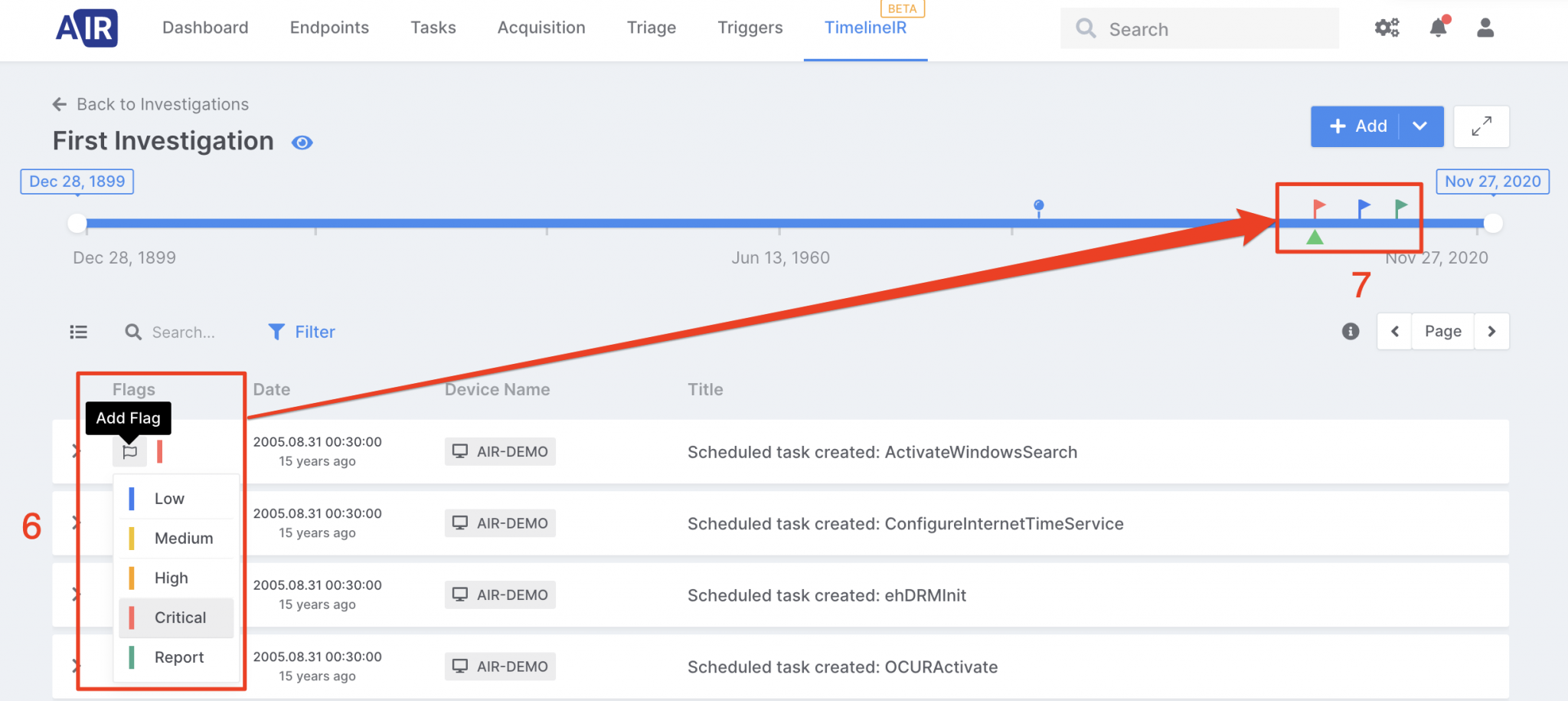
Add milestones that would provide useful for a better understanding of the case,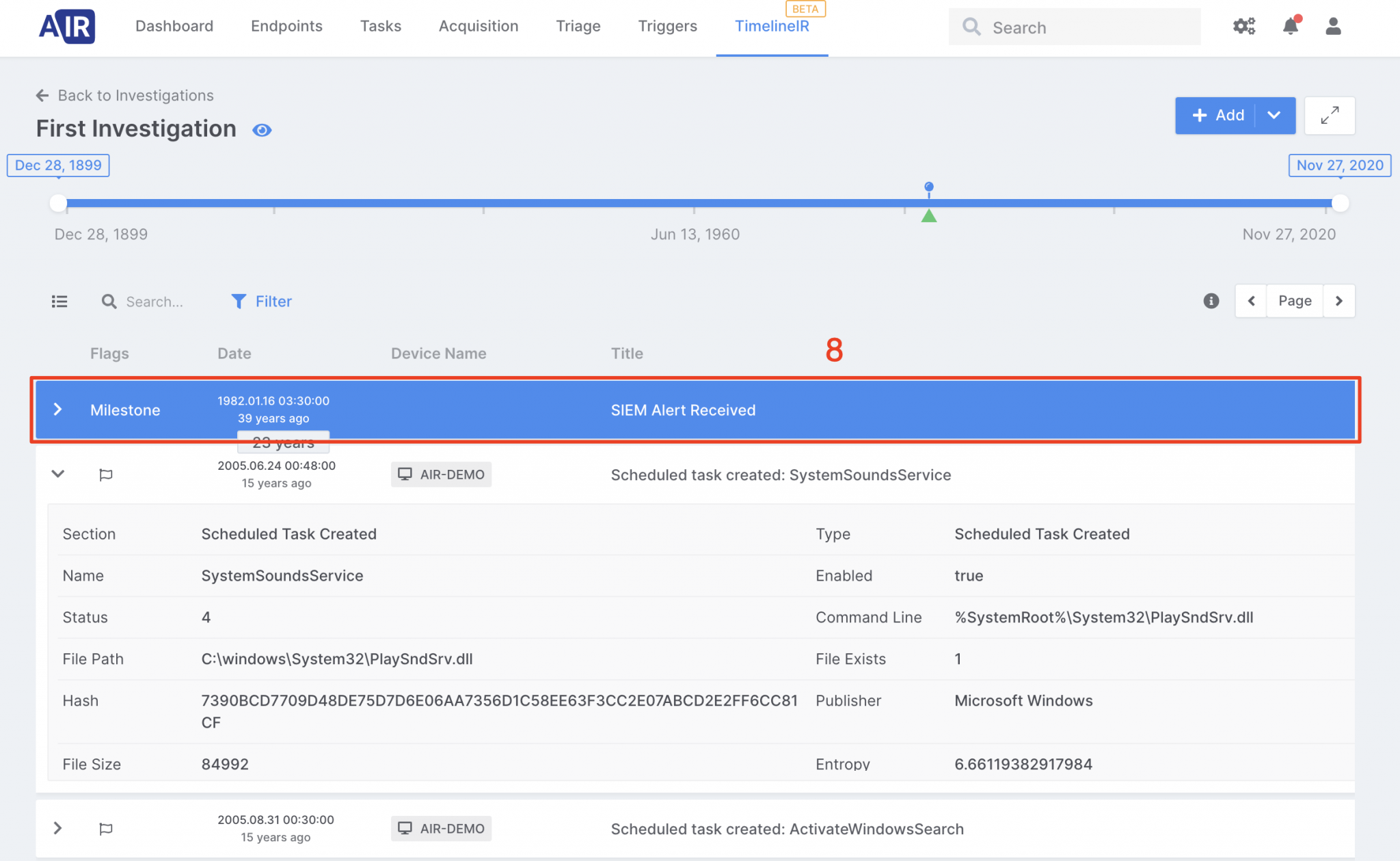
Feeling excited? Download AIR now and easily create a timeline investigation using the link below:
SFTP home run. This Friday we will release the latest version of Binalyze AIR [1.7.35] which will include a number of powerful new features that will be announced individually in the run up to the launch.
New feature: AIR-QRadar integration. Now, an acquisition can be started by triggering AIR via QRadar (credits: Esra Kulüp)
New feature: Added Roles and Privileges. Starting from this version AIR contains 70+ user privileges for more fine-grained control
New feature: Added backup support for case reports and config files. (Database backup is already available beginning from v1.7.16)
New feature: Added AES encryption option for backups
New feature: Added SFTP support to store backups on the remote server
New feature: Added performing bulk operations on the selected endpoints (adding/removing tags, deleting endpoints, starting acquisition triage, and much more. credits: Babak Mirzahosseiny)
New feature: Added triage support to Linux. Now, the file system and memory can be scanned using YARA rules. (credits: Hilko Bengen (https://github.com/hillu/) Author of go-yara (https://github.com/hillu/go-yara))
New feature: Added Custom Content collection from Linux distributions
Added progress update for compression and SFTP upload process on Linux
Added sending matched triage rules to Syslog
Added advance filter options to data grids
Added auto-generated shell script to facilitate Linux deb and rpm packages deployment
Added AIR integration guideline to documentation
Improved policy creation UI & UX
Improved setup process UI & UX
Improved custom SSL certificate information
Improved task completion status UX
Improved nats communication in agent
Implemented more secure cookie-based authentication
Optimized Audit logging performance
Optimized Syslog bulk processing performance
Fixed changing proxy settings when the license is lockdown
Fixed an issue in the agent installer
Fixed some security vulnerabilities
Minor changes and bug fixes
Binalyze AIR v1.8.0 RC is now available.