Tag: Incident Response

The First Step to Forensic Readiness: Risk Assessment

The first step in achieving forensic readiness is to do a complete risk-assessment analysis of all your business operations. The main goal is to identify any potential risk and vulnerabilities in your business processes so you can understand and define where digital evidence may be required and may benefit the organization.

5 Measures to Work Remotely in Secure

Covid-19 pandemic has become the most important topic in cyber security as in many other areas. The pandemic has affected people’s lives and caused significant changes in working procedures of organizations. Many organizations including public institutions activated remote working procedures hastily. In fact, the transition has emerged as an imperative to protect employees and to prevent the spread of the pandemic. So it is still unknown whether they are well prepared for the situation, even if they are practicing the work-from-home right now.

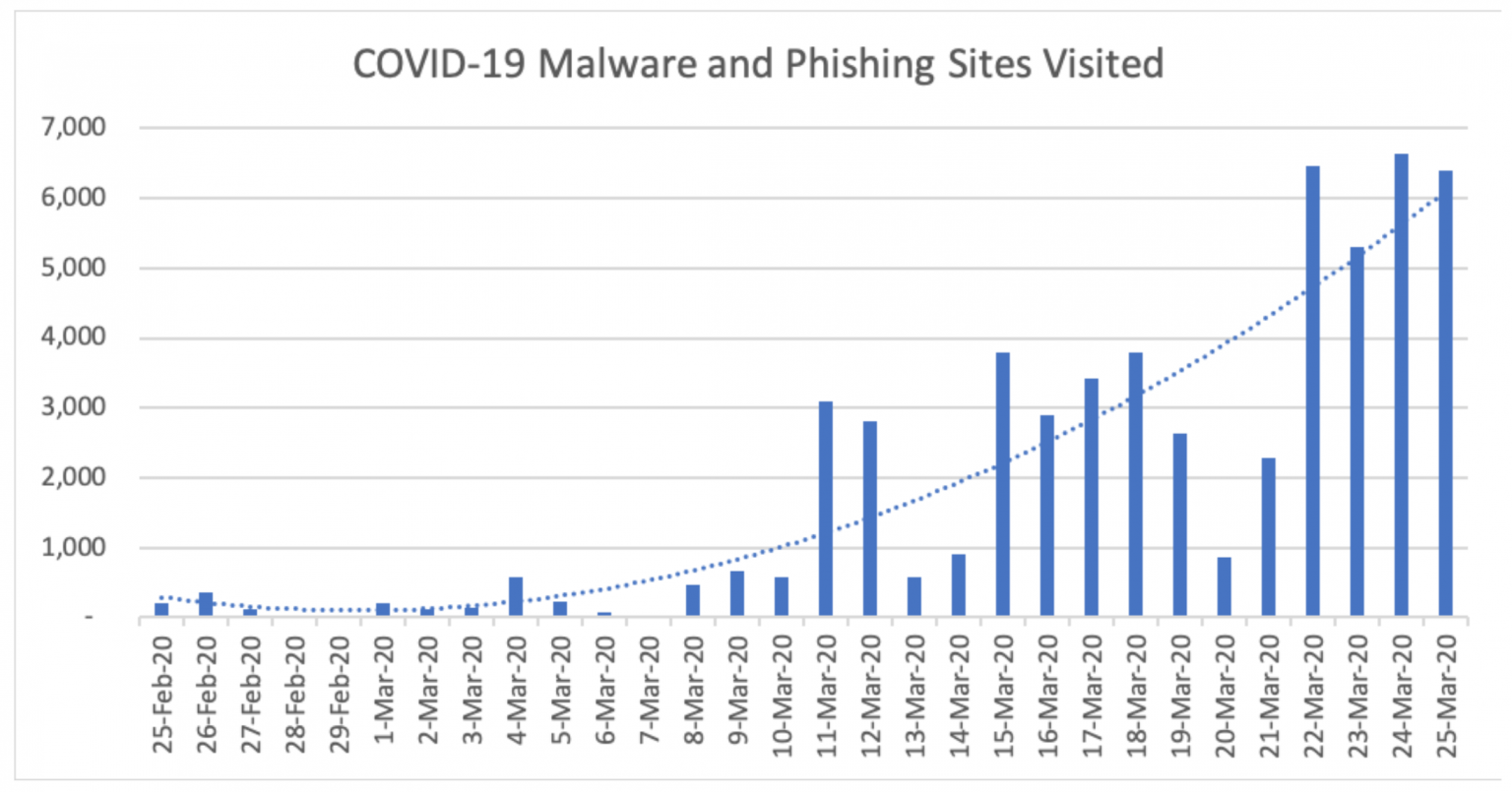
The image that has emerged so far do not give any idea of organizations’ preparation level, but it has clearly showed that there are many cyber attackers who try to exploit the situation caused by the pandemic. The increase in cyber incidents related to Zoom application (daily traffic to its download page increased 535 percent in the last month) which used by many organizations and work-from-home employees is one of the most obvious indicators. Another significant indicator is 32X increase in the number of successful daily phishing attacks. It is obvious that cyber criminals are adapting their techniques to new working environment.

covid-malware-phishing

The organizations will face a serious examination because the increasing number of cyber incidents. The employees sitting in front the computer in the office before the pandemic had the capability to check the whole system physically in order to secure the network and the sensitive information of the organization are now at home and trying to do the same job. At this point, while it is now more difficult to supervise the employees working from home, on the other hand, more time may be needed to detect and respond to a possible cyber incident. Traditional methods, based on physical connection, used by the organizations can be insufficient to respond to incidents. So the organizations need a new perspective. Simple and fast applicable automated procedures and practices will make it easier to respond to incidents and minimize the damage by shortening the reaction time.

Covid-19 pandemic does not seem to end in the short term. So the increase in remote working related to the pandemic will not end soon as well. It is estimated that remote working emerged with the pandemic as a mandatory practice will increase 5-6 times in next two years. It will be better to be ready for this new working environment to be permanent after the pandemic.

Five measures to be taken:

  • Developing a new perspective: Developing a new perspective independent from traditional working pattern will be very helpful to solve the problems which are caused by remote working. When security and IT infrastructure of the organization is reviewed in terms of this perspective, it will be easier to find solutions to possible cyber incidents and determine necessary hardware, software and the need of qualified IT personnel.

  • Training of the employees: Most of the cyber incidents are based on users. Therefore training is of the employees will minimize the risk of a possible incident. Otherwise, even if all necessary measures are taken, the cyber incident is inevitable.

  • Preparing an Incident Response Plan: It vital to have a path to follow when a cyber incident occurs. Because in case of an incident knowing what to do step-by-step will help everyone (employees, IT personnel, experts, managers) and protect the organization from possible simple mistakes and waste of time. Developing an Incident Response Plan, will help organizations get out of the crisis where the time is so valuable and prepare them for future cyber threats.

  • Using VPN: Remote working (probably from a public network) inevitably will cause a need of remote access to organizations critical data. Creating an encrypted and secure tunnel to access the servers of the organization will reduce the risk of a cyber incident. You can make use of the VPN opportunities offered by operating systems as well as the commercial VPN providers.

  • Continuous IT Auditing: It is now more difficult to audit the computers and the network of organizations systematically and to keep the system under control with hasty transition to remote working. This process made the organizations more vulnerable to cyber-attacks. Creating an auditing system for the employees away from IT personnel of the organizations, without a secure internet connection, connecting organizations’ servers from various locations is a mandatory issue to prevent cyber incidents and minimize the response time.

IREC v2: 1-Click Virus Total results and more

It has been quite a long time since the last time we updated you with what’s new on Binalyze. The reason for that is it was a very busy period full of new features, updates, and even a new product! Now it is time to share the news with you.

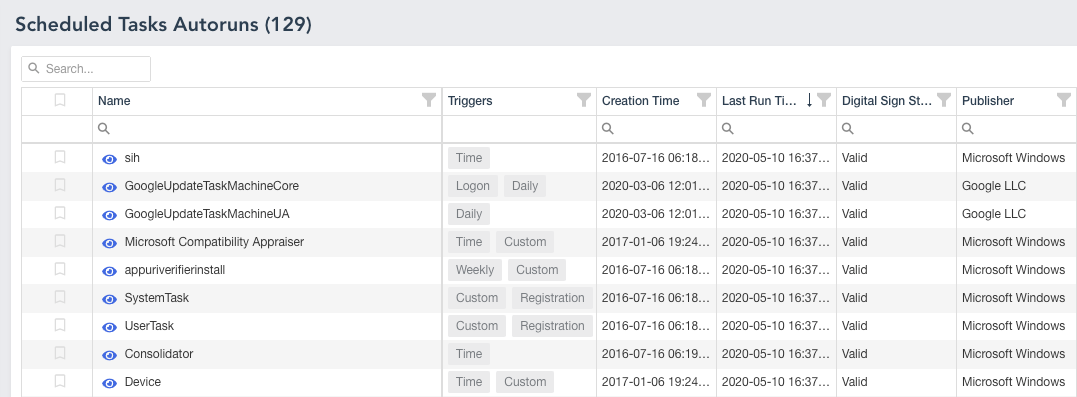
Autoruns

As we all know, investigating a PC is getting harder each and every day due to the increasing complexity of Cyber Attacks. Even though we have designed IREC to be the most complete evidence collector in the market there was still a missing piece: Autostart Locations. As of Windows 10, there are more than 200 registry and file system locations that could be abused by malware and attackers! It means, on a regular PC you will have approximately 1000 entries in total that have the potential of executing malicious code on each system restart. The good news is, IREC v2 lists all of these in an intuitive way with all the information you need such as Digital Signature of the file in question, MAC times for each entry, last write time of the registry key, and the hash of the file!

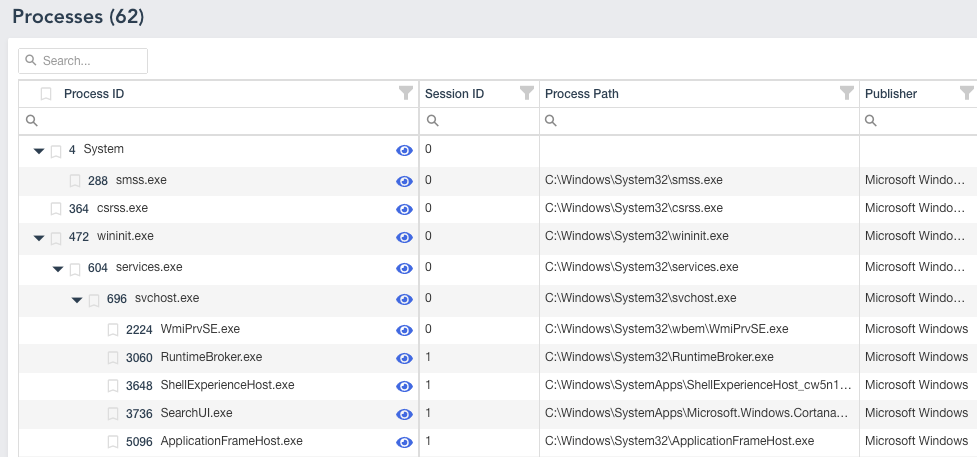
irec-processes


Process Viewer

Version 2 comes with an all-new easy to use process viewer in which you can filter, search, and show the details of each process alongside important information such as TCP Connections, Modules, and other details.

irec-dns-cache


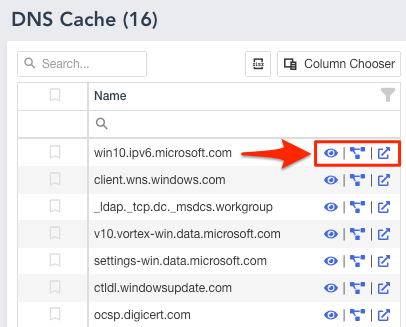
1-Click Virus Total results

The new report lets you view Virus Total results and relations for each URL and IP Address with a single click.

irec-blog


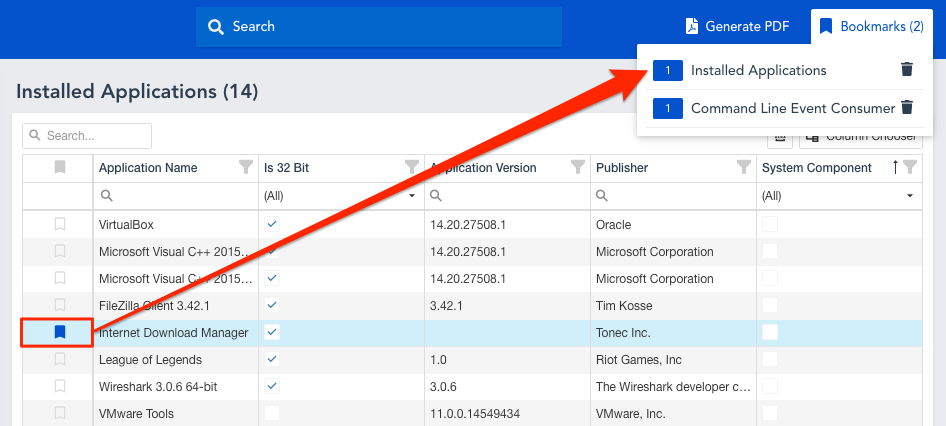
Bookmarking

Wouldn’t it be great to bookmark the pieces of evidence either for further investigation or reporting purposes? That’s why we have added an easy bookmarking feature which will persist in the browser’s local storage. So you won’t lose your bookmarks even when you close the browser.

irec-bookmarks


This is just a quick summary of what we have added to the latest version so far. For the full list you can visit IREC page.

SHIELDing DFIR against CryptoLockers!

Some History

It was around 7 years ago when I analyzed my first CryptoLocker which was just a prototype full of mistakes and weird stuff. My first reaction to this ‘new’ way of making money was “Well, not an art piece compared to what we have been dealing for the last three years (mostly low-level kernel-mode rootkits) but it is still promising”.

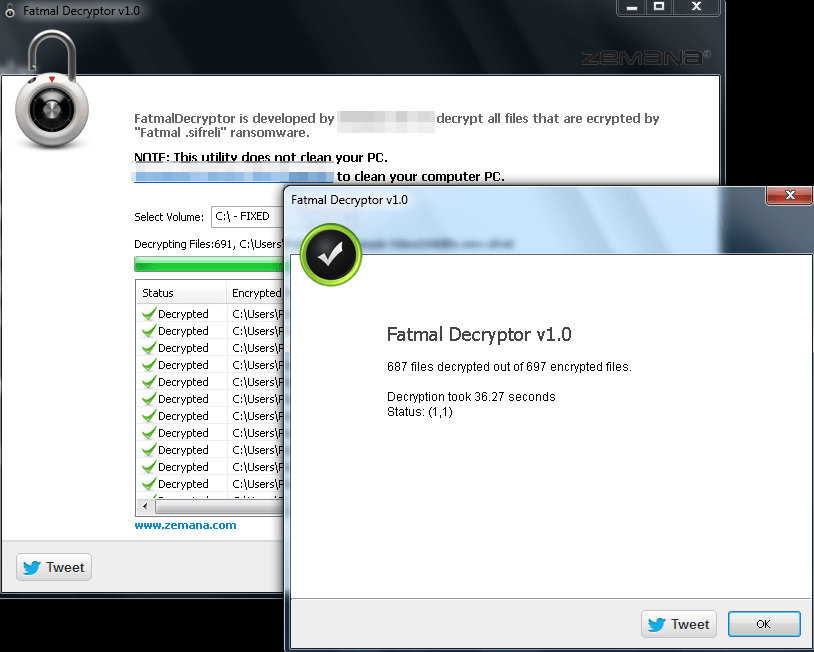
Back in the day, a quick look into the code was more than enough to create a decrypter. But how? The problem was that the attacker was using AES 256 in CTR mode and he was only encrypting the first 2MBs of the files for making the encryption process faster. Finding that all the affected systems had a video file named “Wild Life” which was also encrypted by the CryptoLocker, we have created a decryptor for FREE (zero bitcoins). This was –as far as I know– the first freely available decrypter for a crypto-locker case. The funny thing is, the author of crypto locker fixed his cheap code by switching to AES CBC mode after finding out that the victims were using our tool to decrypt encrypted files, not his :):):)

shielding

7 years fast forward: Our partner CyberArtsPro calls our support team on a Sunday morning in an urgency stating that IREC TACTICAL can not collect evidence from a crypto-locker infected machine?! We were surprised at first but a quick investigation made it obvious that the crypto locker was not only encrypting the user files but also the evidence collected by IREC.

The moment I was informed about the situation, my reaction was “All right. Let the war started.” which led to the development of our new feature “SHIELD”.

What is SHIELD?

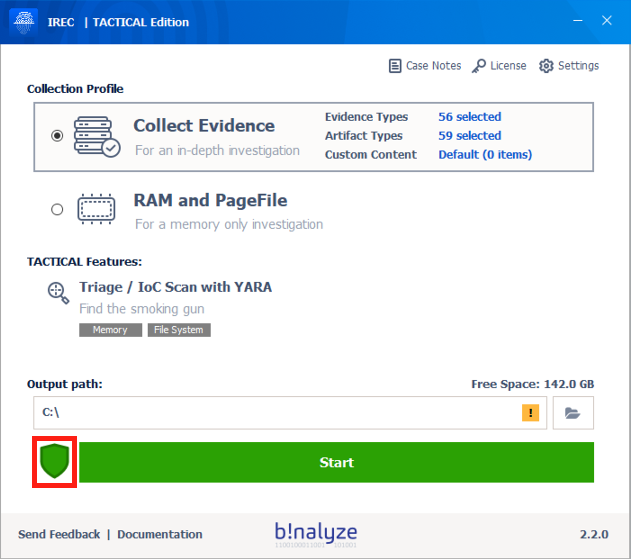
SHIELD is a kernel-mode component added to IREC version 2.2.0 protecting all the evidence collected by our solution regardless of the media it resides in. At its core, it is a Mini Filter driver attaching to all volumes on the affected machine for blocking access of any other application except IREC thus enabling our users to securely collect evidence.

shielding-dfir

At this point, you may be asking what is the point of collecting evidence from an already infected machine. Aren’t crypto locker authors using asymmetric encryption for their ransomware? They mostly do but not always. Remember that most cybercriminals are in chase of easy money which makes them susceptible to making a lot of mistakes. As an example, in a recent case, our partner DIFOSE was able to retrieve the decryption key of VEAM Backups just by using IREC’s Clipboard content collection feature. (Note to attackers: DO NOT copy & paste encryption keys please type them patiently if you want your Bitcoins.)

How to use?

Starting with version 2.2.0, SHIELD will be enabled by default and will stay active until you disable it by clicking the shield icon on the main page of IREC or by clicking one of the two buttons on the acquisition summary page (Open Output Folder / Open Case Html). Please note that IREC will only protect the case files it collects regardless of the location they reside (USB Drive or a network share) which is the reason we suggest you use a USB drive or a network share dedicated for this purpose only.

You can download IREC 2.2 Preview version from the link below: https://cdn.binalyze.ai/irec/IREC-2.2.0(Preview).exe

Enjoy SHIELD and stay safe at home!

Dear Attacker;

Please accept our apologies for decrypting your so-called ultra-secure encrypted files.

YARA+ : Extending YARA for Incident Response

What is YARA?

YARA is the swiss-army knife for pattern matching. It is easy to use, fast and powerful which already led to a quick adoption of it in a variety of platforms.

It provides unprecedented capabilities for finding the evil with only a few lines of script. This goes the same for Incident Response and compromise assessment.

YARA

How does it work?

That’s simple:

  1. Open up your favorite text editor,

  2. Write simple rules composed of a few sections (described below),

  3. Ask YARA to run them against a set of files or processes,

  4. That’s all! Watch YARA finding the evil for you!

Basic Structure of a YARA Rule

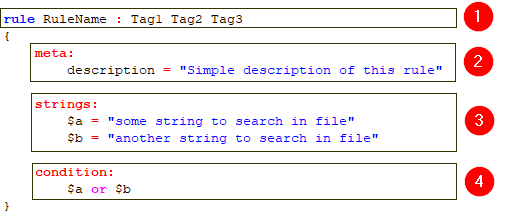
YARA Rules are simply composed of 4 main parts as highlighted below:
YARA-Rule

1. Header Section

The header section is the first section of a YARA rule and it always starts with the keyword rule followed by an optional tags section. You can define any number of tags here.

2. Meta Section (optional)

This is the place you define any number of meta descriptions for your rule. Think of meta descriptions as your notes to users of this rule.

3. Strings Section (optional)

The strings section is one of the most important part of a YARA rule and it is where you define what to search for.

As an example, the above rule defines two strings to search in file contents.

4. Condition Section

As you already see in the above example, this rule will be evaluated as matched in case one of the strings are found in file contents. You can easily change the “or” operator with an “and” operator for making sure both strings are found in the file.

This is just a simple example, more complex and powerful rules can be created by using wild-cards, case-insensitive strings, regular expressions, special operators and many other features that you’ll find explained in YARA’s documentation.

YARA Modules

Modules are the method YARA provides for extending its features. They allow you to define data structures and functions which can be used in your rules to express more complex conditions.

As of version 3.8.1, YARA ships with PE, ELF, Cuckoo, Magic, Hash, Math, Dotnet, and Time modules. You can see what each module provides by visiting YARA modules documentation page YARA documentation.

To give you an example, you can use Hash module for finding a file with MD5 hash value of feba6c919e3797e7778e8f2e85fa033d as below:

condition:
   hash.md5(0, filesize) == "feba6c919e3797e7778e8f2e85fa033d"

Modules provide a really great opportunity for combining YARA’s pattern matching capabilities with file format specific conditions.

IR Modules for YARA

Now you have a basic understanding of how YARA rules are composed and how they can be extended with the help of modules.

Great! But wait a second. Wouldn’t it be great if we were able to add more contextual information such as process name, command line, file times, file name, file extension, and file attributes?

That’s what we thought a few months ago which led to the development of IR oriented YARA modules for providing better Triage and IoC Scan capabilities.

These modules are special to IREC’s implementation of YARA 3.8.1 and by the help of an embedded YARA Editor with an autocomplete support, writing an IR oriented YARA rule takes only a few minutes. Plus, IREC automatically verifies the rule and makes sure it doesn’t have any syntax errors.

See the example below for finding PowerShell executables by using “process” module.

Note: Typing CTRL + . sequence automatically brings up the auto-complete dialog and makes it really easy to write YARA rules just by selecting the appropriate property from a list.
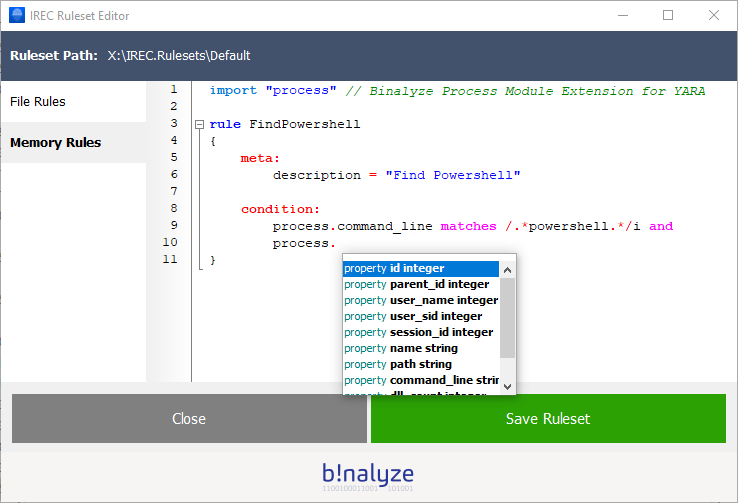
irec-yara-rule

As of IREC version 1.6.2, we provide the following modules with listed attributes/methods:

File module

  • name (string): Name of the file including extension. Example: document.docx

  • extension (string): Extension of file. Example: docx

  • readonly (boolean): Is this a read-only file?

  • hidden (boolean): Is this a hidden file?

  • system (boolean): Is this a system file?

  • compressed (boolean): Is this a compressed file?

  • encrypted (boolean): Is this an encrypted file?

  • modified_time (integer): File’s modification time in YYYYMMDDHHMMSS format

  • accessed_time (integer): File’s last access time in YYYYMMDDHHMMSS format

  • changed_time (integer):  File’s change time in YYYYMMDDHHMMSS format

  • birth_time (integer): File’s MFT entry creation time YYYYMMDDHHMMSS format

Process Module

  • id (integer): Process id

  • parent_id (integer): Parent process id

  • user_name (integer): Username of process

  • user_sid (integer): SID of process user

  • session_id (integer): Session id of process

  • name (string): Process name

  • path (string): Full path of process

  • command_line (string): Command line of process

  • dll_count (integer): Count of loaded dlls

  • dlls (array): Array of loaded dlls

Time module

  • now() (returns integer): Function returning current Unix Timestamp

  • around(source_date, target_date, time_frame) (returns integer): Function for determining if a source date is within the time frame of a target date

External Variables

Extending YARA is not only limited to writing modules. There is also another great feature called “External Variables” and they allow you to define rules which depend on values provided from the outside.

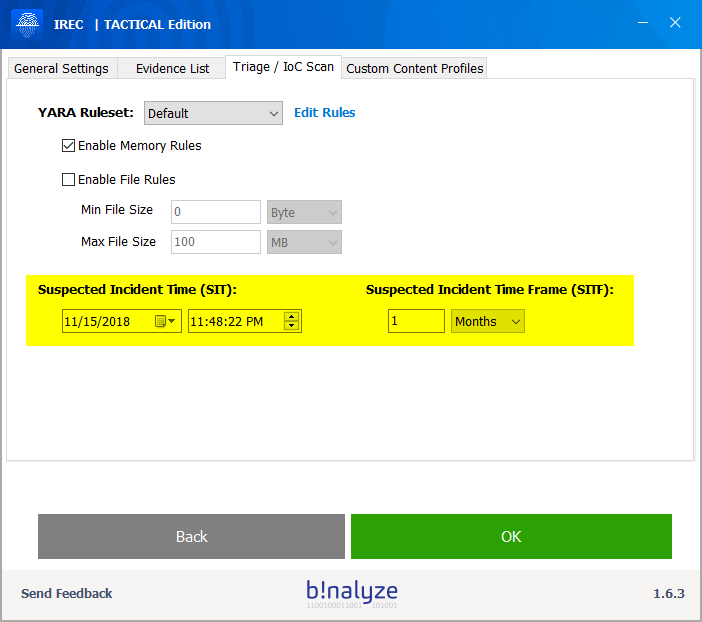
Using this feature, IREC defines two external variables which can easily be adjusted from Settings > Triage / IoC Scan section as shown below.
yara-ruleset

SIT (Suspected Incident Time)

SIT or Suspected Incident Time is an external variable defined as a date-time value.

For the sake of simplicity, we internally define it in YYYYMMDDHHMMSS format so that you can easily use it with file, process and time modules.

Example:

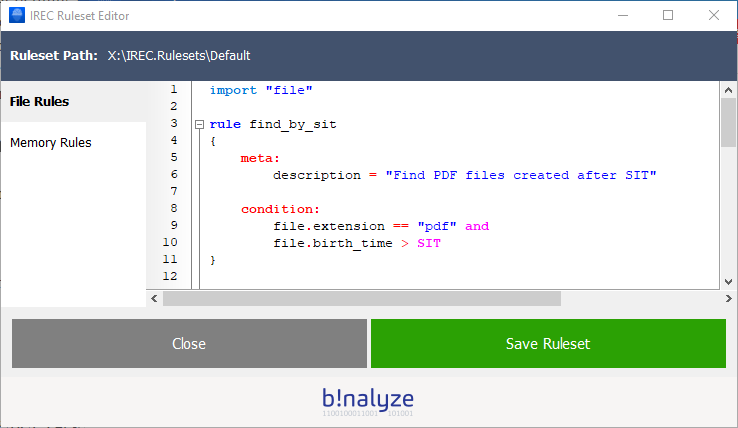
Let’s write a script to find all files created after a specific time:

condition:

file.birth_time > SIT

SITF (Suspected Incident Time Frame)

SITF on the other hand, lets you define a time frame around SIT.

Example:

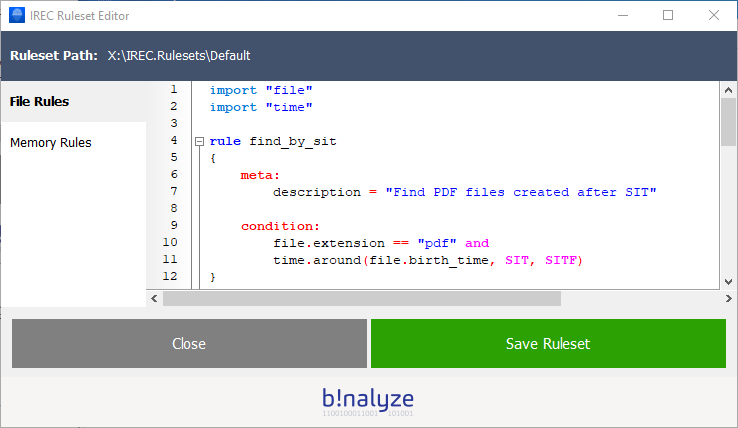
Let’s find all files created within a specific time window:

condition:

time.around(file.birth_time, SIT, SITF)

How SIT and SITF help you?

As you probably realized, you now have two rules based on dynamic values rather than depending on hard-coded ones.

So, you don’t have to edit these rules anymore for every incident response case you are involved in.

Just go to settings section and change their values using the calendar widget. Easy, isn’t it?

Let’s do some Triage

Now you learned what IREC adds upon vanilla YARA. Let’s combine all together and write a few example scripts which will our lives easier on a Triage mission.


1. Find all PDF files created after Suspected Incident Time
yara-rule-pdf


2. Find all PDF files created around Suspected Incident Time
yara-memory-rules


3. Find all PDF files created after a specific date time value
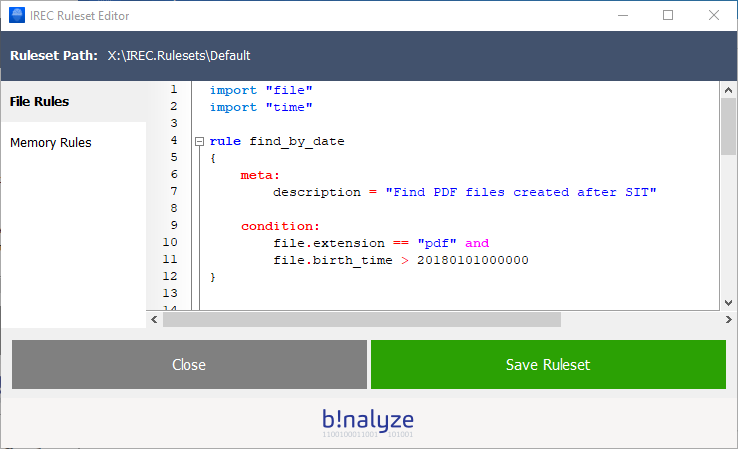
Saving the scripts, we are now ready to perform Triage on any machine. Just go back to home page and click “Start”.

Even before the collection/triage process completes, you will have a chance to see how many files/processes are matched against the rules you provided as you can see below:
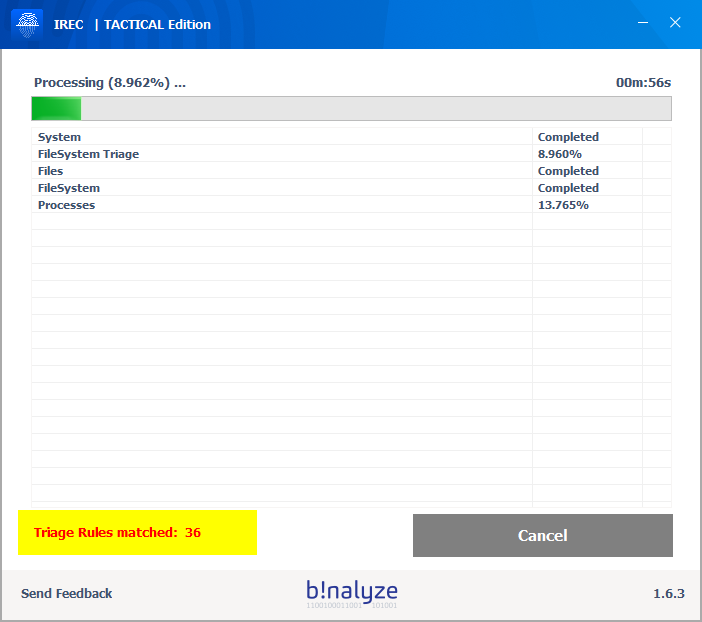
YARA-Rule-7


Results

Once the process completes, you can easily check which files are matched by simply opening the HTML report. Notice that we were even able to find files in Recycle Bin!
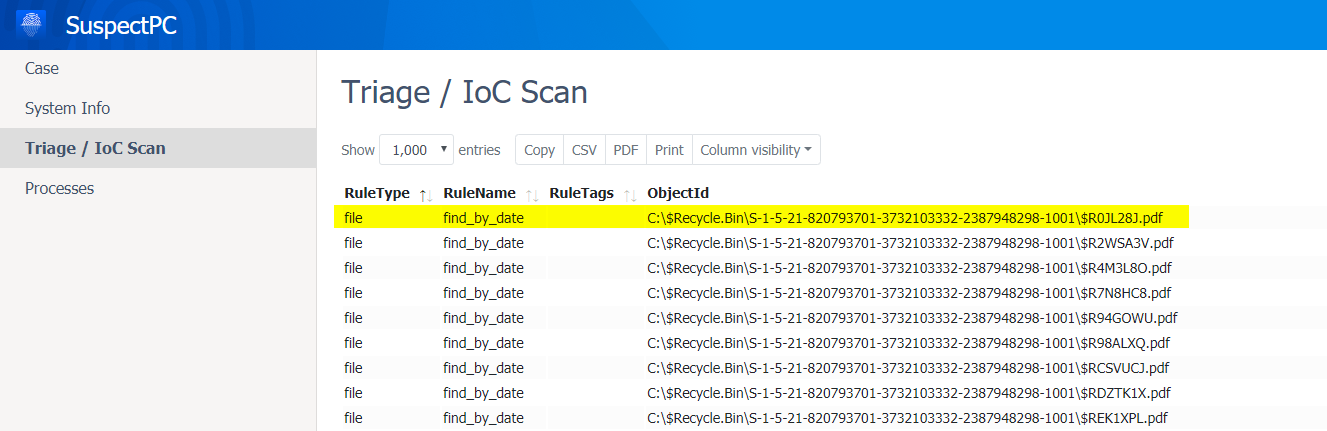
triage-ioc-scan

To summarize, using YARA with incident response oriented modules highly increases the speed and efficiency of a Triage / IoC Scan process. We will be demonstrating how to use YARA for Evidence Collection just by adding a simple YARA tag “collect” into your rules. So, stay tuned for the next blog post.


Incident Response Plan 2022

Incident Response is a set of actions aiming to detect and eliminate a cybersecurity breach and recover from it. Like all other Cyber Operations, it requires a systematic approach to be efficient and successful. For this purpose, every organization should have an Incident Response Plan which is the most important element for approaching cybersecurity incidents systematically to overcome it even before they cause damage to organizations’ reputation, finance, and data.

Start triage with already set YARA rules for SUNBURST

3 weeks ago, one of the biggest breaches happened where FireEye uncovered a malicious campaign that gained access to victims via trojanized updates to Orion, SolarWinds’ IT monitoring and management software. Being aware of the nationwide damages this breach will produce, Binalyze released an initiative where we decided to give support to SUNBURST damaged entities by releasing a version of Binalyze AIR with the codename SUNBURST that will enable anyone to identify their exposure to the attack and pinpoint their network vulnerability in under an hour.

This version is FREE of charge for 15-days and 25,000 endpoints.

Binalyze is the fastest evidence collection, triage, and IR investigation platform that now also contains the YARA Rules for SUNBURST thanks to our colleagues at FireEye. In the below lines you will find instructions how to perform a triage with already set YARA rules for SUNBURST in less than an hour.

Now it is time to showcase how easy it is.

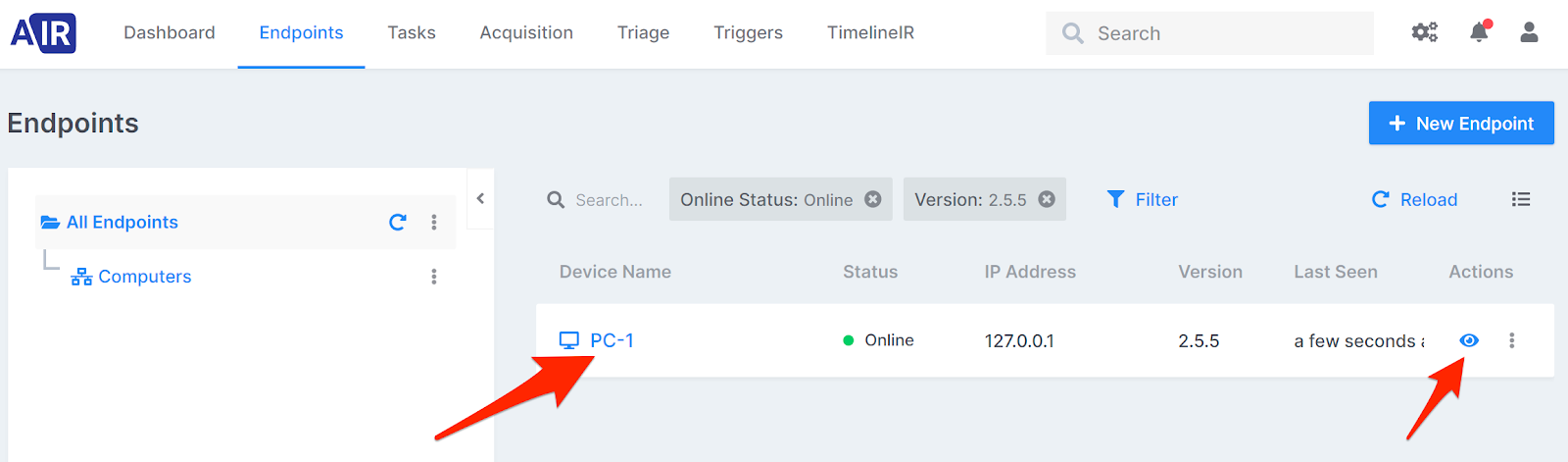
  1. Select an endpoint

    yara-rules-air

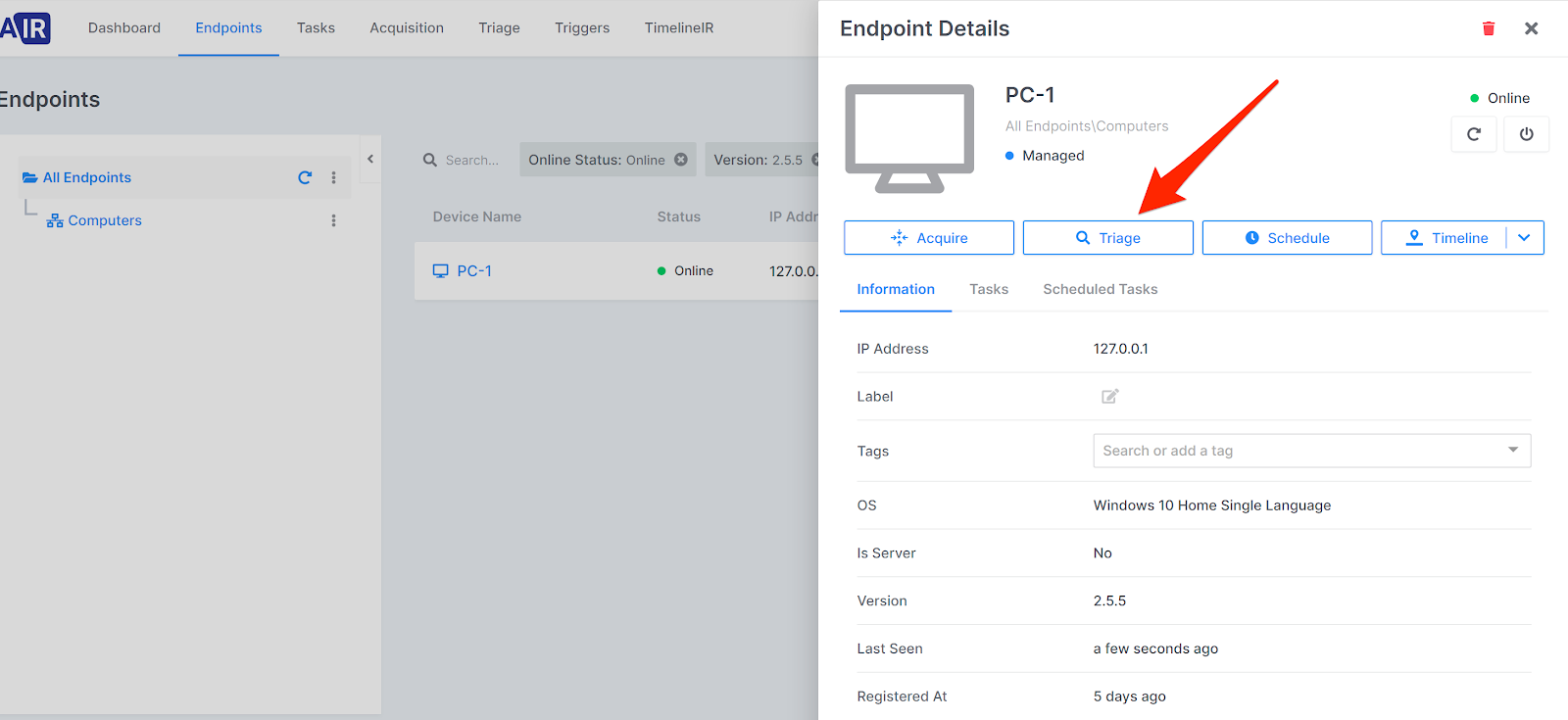
  2. Click on “Triage” button

    sunburst-yara

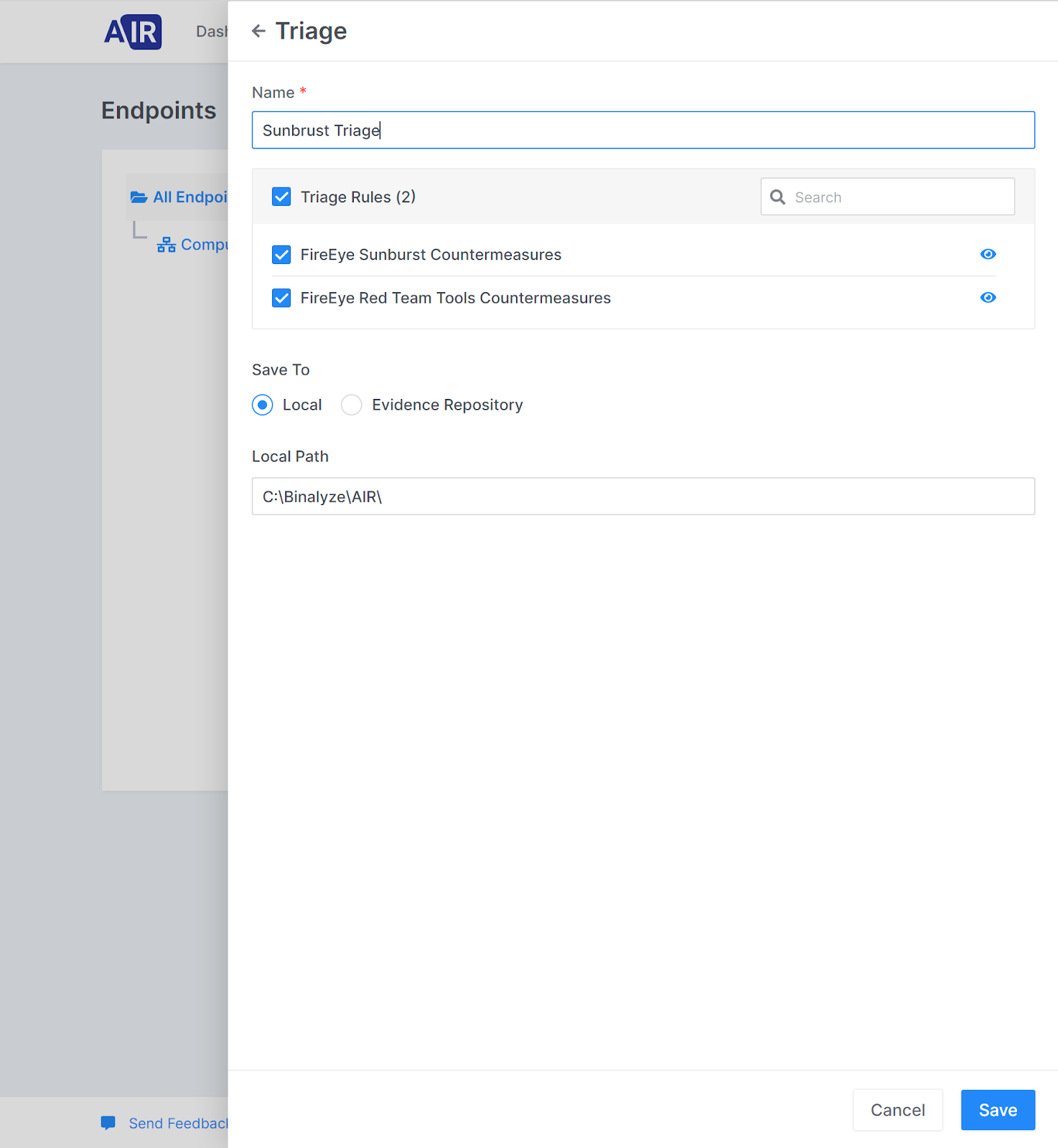
  3. Select both SUNBURST YARA rules and click on “Save”.

    yara-rules-sunburst

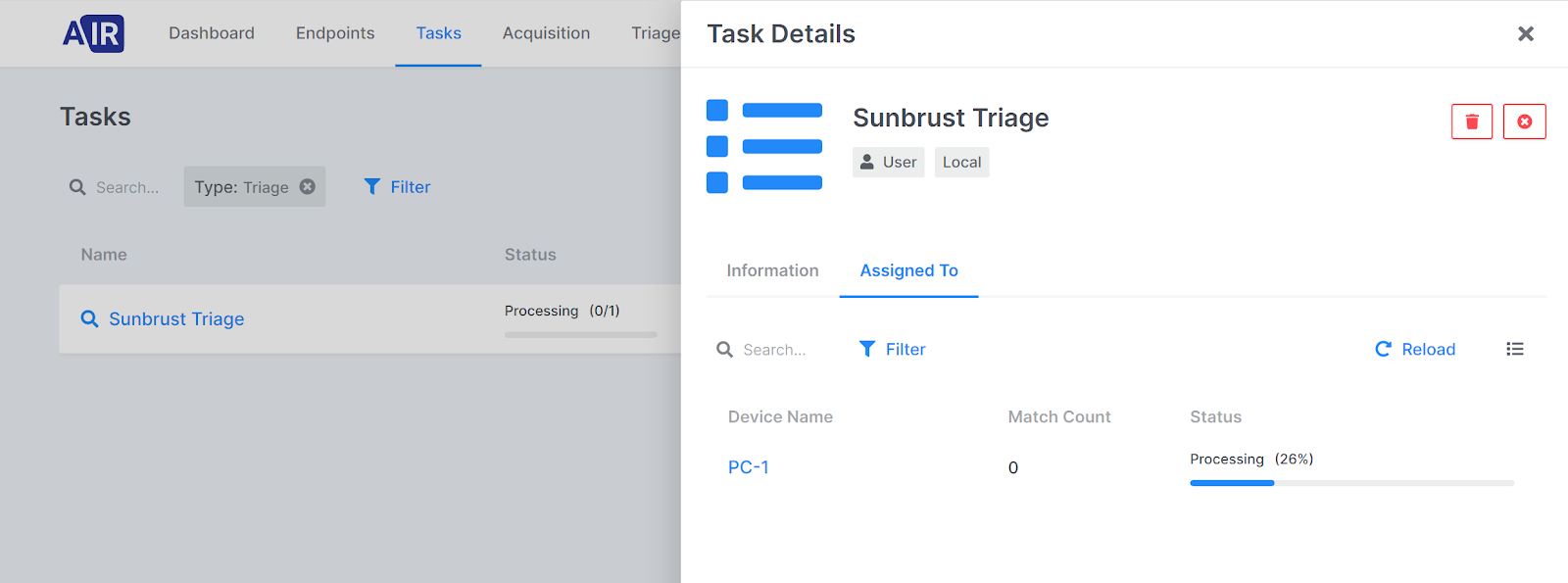
  4. Triage is now in processing.

    yara-sunburst

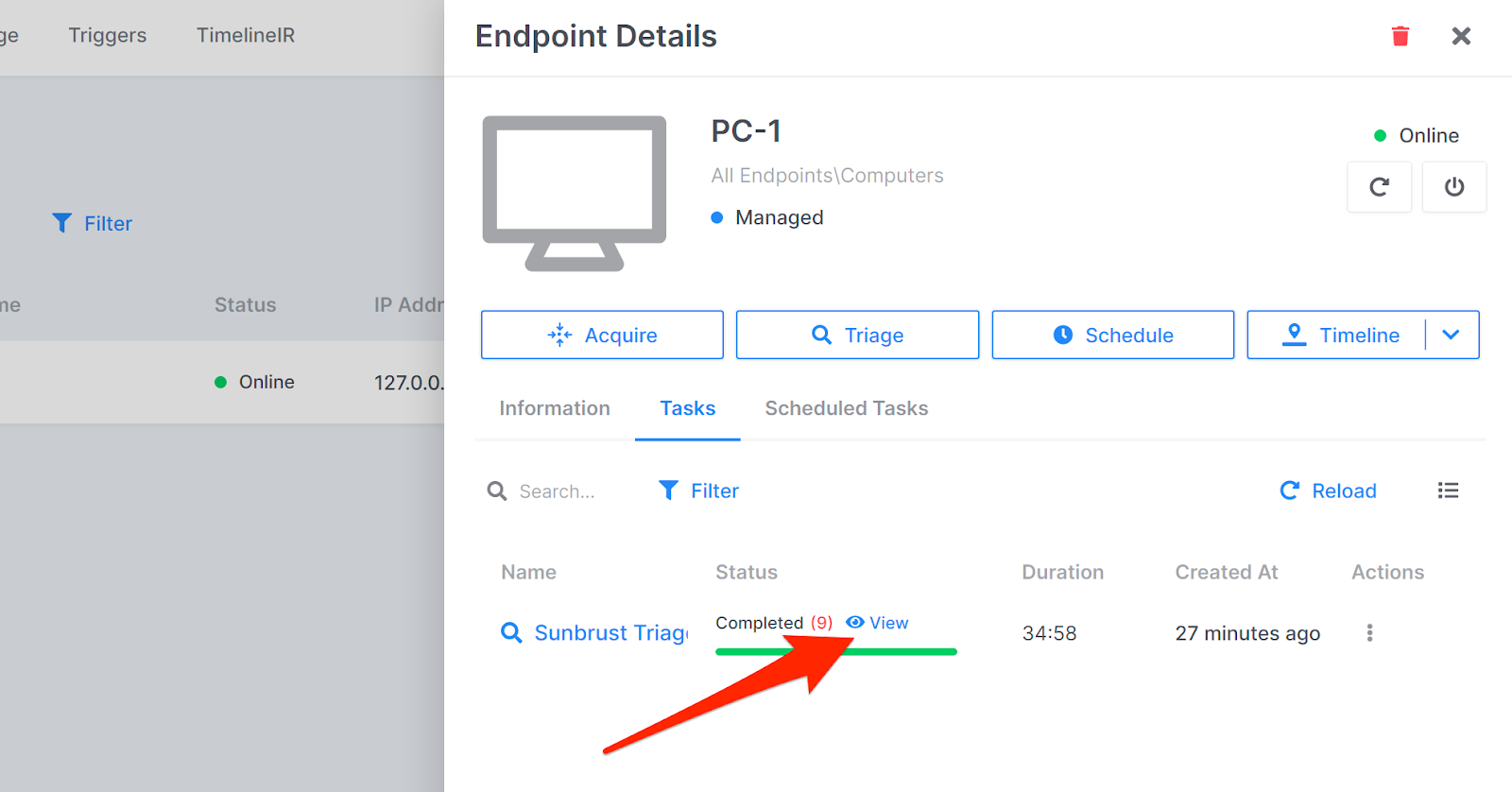
  5. As said it is done in less than an hour or to be exact in 34 minutes.

    yara-rules

  6. To see full view of the investigation results click on “View”.

{{cta(‘cea177d3-11e7-42f2-a4b1-8007f735fad0’)}}